BibleScope Software for iPhone and iPod Touch

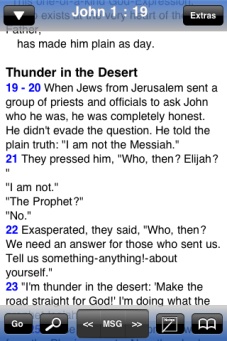
BibleScope is an app that allows you to read and study God's Word

It is written exclusively for the Apple iPhone and iPod Touch, running the 3.0 or greater firmware

app store logo
picture picture picture picture picture

Features

  • Navigate all books and chapters of the Bible using either a "wheel dial" selector, a table selection with a shortcut bar to the right side, or single page with buttons for the book,chapter, and verse.
  • Add bookmarks to jump to specific locations in the Bible, and have a custom name for each bookmark.  Add folders to organize your bookmarks into sections.
  • Compose study notes that are saved with the current book and chapter, or compose loose notes for general study.  Email the notes to yourself or others for study and archival.   Add folders to organize your notes into sections
  • Keyword search to find specific words in the Bible, various options to filter the results within a certain book, search for exact phrase, or searching Easton's Bible dictionary.
  • Settings screen inside BibleScope includes background, font, font size, colors and many more options to customize your experience.
  • No Internet connection needed. All Bible content is locally within the app.  
  • Daily devotional texts include Charles Spurgeon's Morning and Evening, Daily Path devotional, and a Daily Bible Reading selection.  An additional screen is available for a daily reading plan to read through the Bible in a year.
  • Words of Christ in red for the KJV, WEB, NIV, ESV and NASB translations.
  • Many extra Bible translations can be downloaded for free from within BibleScope, and others (NIV, ESV, NASB, HCSB and others) can be purchased directly from within the app.
  • Bars at the top and bottom slide in/away with a press of the screen.
  • Split-screen display that shows two Bible translations simultaneously.
  • Swipe left/right to go to previous/next chapter.
  • Select a verse number to add a bookmark, note, highlighting, or to view commentary for that verse.

For many more features and information go to the Features page


picture

myVerses - Feb 5

I wrote an app for Lifeway called myVerses and it is now available in the App Store
It is a verse memorization app that includes the HCSB and KJV and helps you memorize verses by using categories and flashcard view.

The memorization features have been included in the 3.3 release of BibleScope.

picture

BibleScope 3.3 - Feb 4

The 3.3 update of BibleScope has been approved by Apple and is available in the App Store

  • Adds the verse memorization feature that allows you to have lists of memory verses and can view the verses individually and has a flash card view
  • You can send the memory verses to friends using email, twitter, and facebook
  • Added the status bar back for main reading view
  • Added a button to clear the daily reading plan days
  • Added backup/sync for highlights so they can always be safe in the case of a re-install
  • Various updates and fixes

iPad

I will be looking into the iPad capabilities and seeing if it makes sense to make a version of BibleScope specifically for it.

picture

BibleScope 3.2 - Sep 12

The 3.2 release of BibleScope has been approved by Apple and has these fixes and changes:

  • Changes to the way screen rotations are handled
  • Changed way all translation downloads are handled
  • Option to move the verse jump shortcut to left side or hidden
  • Chronological daily reading plan has been added
  • Option to make the top/bottom bars opaque
picture

BibleScope 3.1 - Aug 26

The following are the new features and changes in the 3.1 update:

  • Folders are now available to organize your notes
  • Added server-side editing of your notes with 2-way sync to your device
  • HCSB translation is now available for purchase within BibleScope
  • Red letter text for the words of Christ can be toggled off or changed to a different color
  • Added a few new backgrounds
  • Added colors to Bible book names in grid view for book/chapter/verse selection
  • Added notes edit beside the text when in landscape
  • Added line height setting
  • Added John Gill exposition to verse commentary selection

As part of this update, you now have the ability to edit/create your notes on this website and then transfer them to your device. To edit your notes, click the 'Member Login' link above.

picture

BibleScope 3.0 approved and other updates - Jul 7

The BibleScope 3.0 update is now approved and available in the App store. You will need to have the iPhone/iPod Touch OS 3.0 update installed first.

  • Added In-App purchase of translations using your iTunes account
  • Tilt-to-scroll feature. Can be toggled in Settings screen
  • New setting to allow UI menu bars toggling only on double tap
  • Email of notes is now all done within BibleScope
  • Couple new backgrounds and colors, and tweaked the way the backgrounds work so they don't flash white anymore in certain cases
  • Copy and Paste works for Notes screen (though this is mainly due to iPhone/iPod Touch OS 3.0)
  • Fixed a bug with creating empty bookmark folders
  • Scrolling in split screen now works for top and bottom
  • Several other minor updates

I have also recently added a few translations: a Byzantine Greek translation courtesy of Paul Avery, the John Gill exposition of the Bible, and the German Elberfelder 1905 translation. I should have the HCSB translation available soon.

picture

Holman Christian Standard Bible (HCSB) translation - Jun 12

The Holman Christian Standard Bible (HCSB) translation will be coming soon to BibleScope, just after the release of BibleScope 3.0. The license for the HCSB will be worldwide.

picture

BibleScope 2.2 approved - May 13

The 2.2 update for BibleScope has finally been approved for the Message/ERV and the standard version of BibleScope. The BibleScope w/ NIV is still awaiting approval. This update adds:

  • Folders for bookmarks so you can organize your bookmarks
  • Landscape mode now works normally showing all UI elements in landscape
  • Sync for bookmarks and notes
  • Grid view for book/chapter/verse selection
  • Pressing a footnote or verse # doesn't toggle the menu bars anymore
  • Email button for individual notes
  • Added a popup link to show commentary for a verse, provided either the Adam Clarke or Treasury of Scripture Knowledge commentaries are downloade

I have also recently added a few translations: a Byzantine Greek translation courtesy of Paul Avery, the John Gill exposition of the Bible, and the German Elberfelder 1905 translation. I should have the HCSB translation available soon.

picture

BibleScope 2.1 approved - Mar 4

The 2.2 update for BibleScope has been approved. This update adds:

  • Adding 2 new translations: La Palabra de Dios Para Todos (Modern Spanish translation) for purchase, and a free Revised Korean translation
  • Search enhancements: including faster searches and ability to filter the search to current book, OT, NT or Entire Bible. You can also choose to search by phrase or as keywords
  • Highlights: can now be one of 5 different colors, and the current verse you are at is remembered after you select a verse for highlight
  • Footnote view:
    • ERV now adds footnotes to text
    • You can now toggle the footnote window to make it taller to see those larger footnotes or notes you have entered
  • Verse navigation history is now stored in the database so it is persistent between BibleScope restarts
  • Regular user notes that you have entered can now be clicked on and shown in the footnote view so you can see them while you are viewing the verse text
  • Added option for the Next and Prev buttons to navigate in the search results
  • Added a Daily Reading plan that is more traditional in that it goes straight from Genesis to Revelation.  This option can be changed in the Settings screen.
  • Fixed issue with certain characters causing problem with saving user generated notes

I have also recently added a few translations: a Byzantine Greek translation courtesy of Paul Avery, the John Gill exposition of the Bible, and the German Elberfelder 1905 translation. I should have the HCSB translation available soon.

picture